Understand why one branch does not show every commit
Run git log without arguments and Git starts from HEAD, then follows parent links. The git log documentation says it lists the commits reachable from the given commits by following parent links, and that it defaults to HEAD. A commit that lives only on another branch, one your current branch never merged, is not reachable, so it stays invisible. Showing git log for all branches means telling Git every starting point.
To see it, build a throwaway repository. It is the same one as in the git log –graph guide, so skip the setup if you already have it. The dates are fixed, so these exact commands give the same IDs as the outputs below. Change anything and yours will differ. The outputs come from Git 2.23 and are identical on Git 2.30 and 2.54.
mkdir demo-log && cd demo-log
git init
git config user.name "Example Dev"
git config user.email [email protected]
commit_at() { git add . && GIT_AUTHOR_DATE="$1" GIT_COMMITTER_DATE="$1" git commit -q -m "$2"; }

echo "# Demo" > README.md && commit_at 2026-09-01T10:00:00+0000 "Add README"
git branch -M main
echo "start" > app.txt && commit_at 2026-09-02T10:00:00+0000 "Add app skeleton"
echo "port=8080" > config.txt && commit_at 2026-09-03T10:00:00+0000 "Add default config"

git checkout -b feature
echo "search" >> app.txt && commit_at 2026-09-05T10:00:00+0000 "Add search option"
echo "search ok" > tests.txt && commit_at 2026-09-09T10:00:00+0000 "Add search tests"

git checkout main
git checkout -b docs
echo "# Demo guide" > README.md && echo "TODO" > guide.txt && commit_at 2026-09-06T10:00:00+0000 "Draft user guide"

git checkout main
echo "# Demo app" > README.md && commit_at 2026-09-08T10:00:00+0000 "Rename project title"
echo "port=9000" > config.txt && commit_at 2026-09-10T10:00:00+0000 "Change default port"
GIT_AUTHOR_DATE=2026-09-12T10:00:00+0000 GIT_COMMITTER_DATE=2026-09-12T10:00:00+0000 git merge feature --no-edit -m "Merge branch 'feature'"
HEAD is on main, which merged feature but never received docs. List the history, then the branches:
git log --oneline --decoratee6d515e (HEAD -> main) Merge branch 'feature'
d242263 Change default port
c7bfac7 (feature) Add search tests
3dc02d2 Rename project title
b13288d Add search option
ccb94c7 Add default config
9cfbfd0 Add app skeleton
3d7dc15 Add READMEgit branch -v docs f8fe6dd Draft user guide
feature c7bfac7 Add search tests
* main e6d515e Merge branch 'feature'docs exists and holds a commit, f8fe6dd, that the first command never printed. A range shows exactly what docs has and main lacks. According to gitrevisions, main..docs means the commits reachable from docs, excluding those reachable from main:
git log --oneline main..docsf8fe6dd Draft user guideAdd –all to git log
--all removes the need to name every branch. Combine it with --graph --oneline --decorate to see the shape of the history as well:
git log --all --graph --oneline --decorate* e6d515e (HEAD -> main) Merge branch 'feature'
|\
| * c7bfac7 (feature) Add search tests
| * b13288d Add search option
* | d242263 Change default port
* | 3dc02d2 Rename project title
|/
| * f8fe6dd (docs) Draft user guide
|/
* ccb94c7 Add default config
* 9cfbfd0 Add app skeleton
* 3d7dc15 Add READMEThe documentation defines --all as pretending that all the refs in refs/, along with HEAD, are listed on the command line. Every branch tip becomes a starting point, so f8fe6dd (docs) now appears in its own column, leaving from ccb94c7.
Two narrower options exist: --branches starts from the refs in refs/heads, and --remotes from those in refs/remotes. Once you see another branch next to main, the next question is how to bring it in. Choosing between merge and rebase answers it.
Read local and remote references
Create a bare repository from the demo, then clone it. The clone is a separate repository with a local main and origin/… references:
cd ..
git clone --bare demo-log demo-remote.git
git clone demo-remote.git demo-clone
cd demo-clone
git branch -a
* main
remotes/origin/HEAD -> origin/main
remotes/origin/docs
remotes/origin/feature
remotes/origin/mainOnly main exists locally. origin/docs, origin/feature and origin/main are remote-tracking branches. The Git glossary defines them as refs that follow changes from another repository, typically named refs/remotes/<remote>/<branch>. Here origin/HEAD is an alias that points at origin/main. Run the first command again:
git log --oneline --decoratee6d515e (HEAD -> main, origin/main, origin/HEAD) Merge branch 'feature'
d242263 Change default port
c7bfac7 (origin/feature) Add search tests
3dc02d2 Rename project title
b13288d Add search option
ccb94c7 Add default config
9cfbfd0 Add app skeleton
3d7dc15 Add READMEDecorations list every ref on a commit. main, origin/main and origin/HEAD share e6d515e, and origin/feature sits on c7bfac7. The docs commit is still missing, because origin/docs is not an ancestor of HEAD. Add --all:
git log --all --graph --oneline --decorate* e6d515e (HEAD -> main, origin/main, origin/HEAD) Merge branch 'feature'
|\
| * c7bfac7 (origin/feature) Add search tests
| * b13288d Add search option
* | d242263 Change default port
* | 3dc02d2 Rename project title
|/
| * f8fe6dd (origin/docs) Draft user guide
|/
* ccb94c7 Add default config
* 9cfbfd0 Add app skeleton
* 3d7dc15 Add READMEIn this clone, the four starting points behave like this:
| Command | Starts from | Shows f8fe6dd |
|---|---|---|
git log |
HEAD |
No |
git log --branches |
Local branches | No |
git log --remotes |
Remote-tracking branches | Yes |
git log --all |
Everything in refs/, plus HEAD |
Yes |
The origin/… names do not move on their own. In a test, a commit pushed to the remote from another repository appeared in git log --all only after git fetch.
Check branches in the graph view
GitMini has no “all branches” switch to turn on. Its graph starts from HEAD, every local branch, every remote branch and every tag at once, so the branches and tags you see are the ones git log --all --graph --oneline --decorate would reach, without typing the option. GitMini orders rows by commit date, like --date-order, so the order of rows can differ from the grouped columns of --graph.
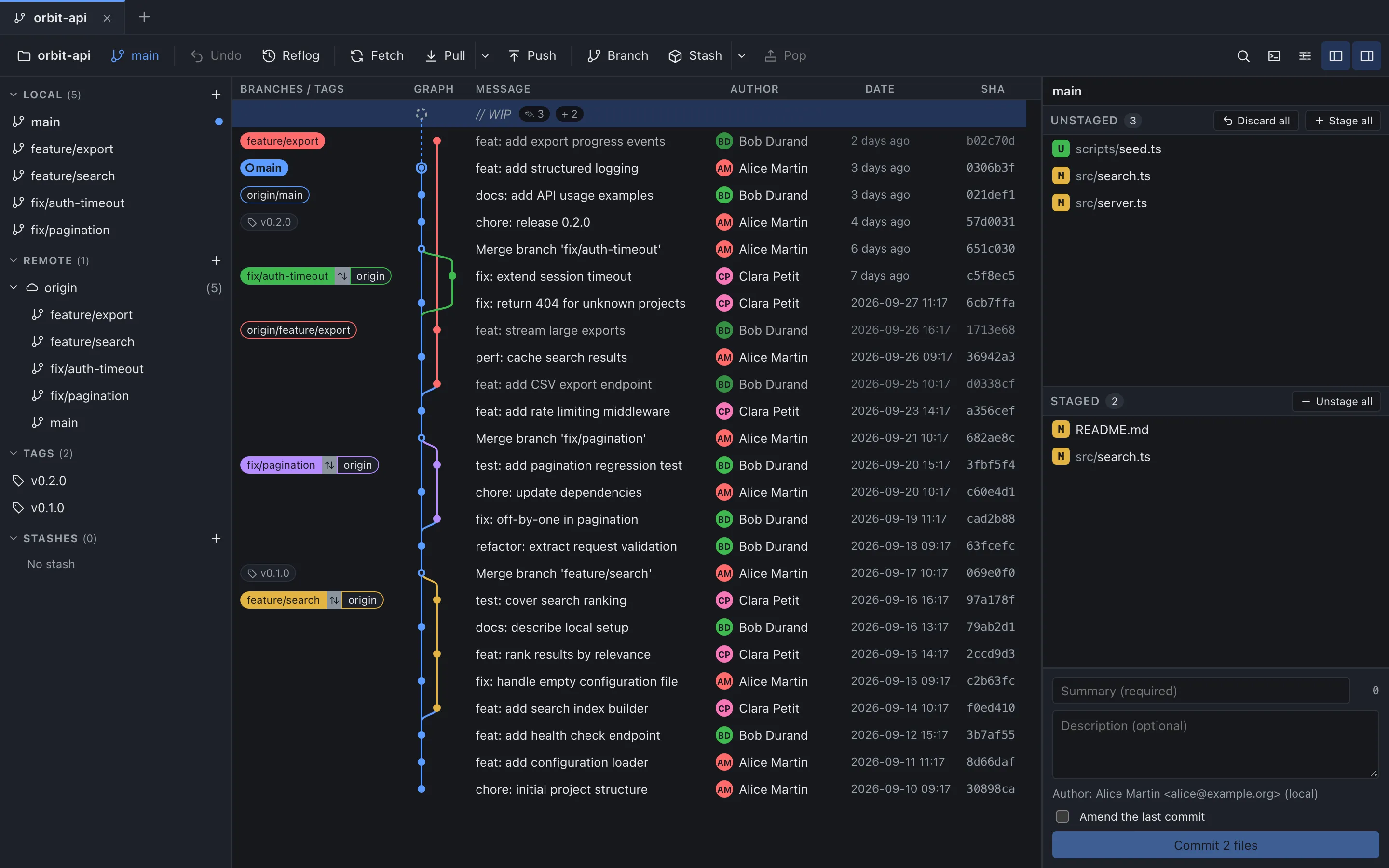
The “Branches / tags” column carries the labels (headers and sidebar titles are displayed in capitals). A local branch and the remote branch at the same commit share one label, for example fix/pagination ⇅ origin in the capture. A remote branch without a local twin keeps its full name, such as origin/feature/export. A row shows two labels at most; a “+n” badge counts the others, and its tooltip lists all the labels of the row. origin/HEAD is not displayed.
The sidebar sections “Local”, “Remote” and “Tags” list the same references, and clicking a branch there selects its tip commit in the graph. The “Graph” column shows up to 12 lines side by side. If more run in parallel, the extra ones are hidden and the column header’s tooltip gives their number, such as “2 hidden lanes”.
GitMini has no per-branch filter: the search bar only moves between matches while the whole graph stays in place. If a remote branch you expect is missing, remember that remote references only move when you fetch, pull or push: the “Fetch” button in the toolbar fetches all remotes.
Sources
- Git: git-log, consulted on October 4, 2026.
- Git: gitrevisions, consulted on October 4, 2026.
- Git: gitglossary, consulted on October 4, 2026.
- GitMini product README, consulted on October 4, 2026.