Display history with git log –graph
git log prints commits as a flat list, newest first. git log --graph adds a drawing: Git shows the shape of the history in plain text on the left of each commit, so you can see where branches split and where they join. The git log documentation describes it as a text-based graphical representation of the commit history, and warns that Git may print extra lines between commits to draw it properly.
To follow along, build a throwaway repository in bash or zsh. Every date is fixed, so these exact commands should give you the same IDs as the outputs below. Change one character and yours will differ. The outputs come from Git 2.23 and are identical on Git 2.30 and 2.54.
mkdir demo-log && cd demo-log
git init
git config user.name "Example Dev"
git config user.email [email protected]
commit_at() { git add . && GIT_AUTHOR_DATE="$1" GIT_COMMITTER_DATE="$1" git commit -q -m "$2"; }

echo "# Demo" > README.md && commit_at 2026-09-01T10:00:00+0000 "Add README"
git branch -M main
echo "start" > app.txt && commit_at 2026-09-02T10:00:00+0000 "Add app skeleton"
echo "port=8080" > config.txt && commit_at 2026-09-03T10:00:00+0000 "Add default config"

git checkout -b feature
echo "search" >> app.txt && commit_at 2026-09-05T10:00:00+0000 "Add search option"
echo "search ok" > tests.txt && commit_at 2026-09-09T10:00:00+0000 "Add search tests"

git checkout main
git checkout -b docs
echo "# Demo guide" > README.md && echo "TODO" > guide.txt && commit_at 2026-09-06T10:00:00+0000 "Draft user guide"

git checkout main
echo "# Demo app" > README.md && commit_at 2026-09-08T10:00:00+0000 "Rename project title"
echo "port=9000" > config.txt && commit_at 2026-09-10T10:00:00+0000 "Change default port"
GIT_AUTHOR_DATE=2026-09-12T10:00:00+0000 GIT_COMMITTER_DATE=2026-09-12T10:00:00+0000 git merge feature --no-edit -m "Merge branch 'feature'"
The commit_at helper stages everything and commits at the date you give it. The script creates main, a feature branch that diverges from it, a docs branch with a commit that main never receives, and a real merge of feature into main. Start with the two newest commits in the full format:
git log --graph -n 2* commit e6d515ee0fe2be9bcedf2c17df09d1f89e06c799
|\ Merge: d242263 c7bfac7
| | Author: Example Dev <[email protected]>
| | Date: Sat Sep 12 10:00:00 2026 +0000
| |
| | Merge branch 'feature'
| |
| * commit c7bfac7154d36e606685f5b1e10a43a2e5ba7b96
| | Author: Example Dev <[email protected]>
| | Date: Wed Sep 9 10:00:00 2026 +0000
| |
| | Add search testsEach * is a commit. The |\ under the first one is the merge splitting into two columns, one per parent, and the second commit, c7bfac7, sits in the right-hand column. The full format gets long fast, so the usual pairing is --oneline --decorate. Here is the flat list first:
git log --oneline --decoratee6d515e (HEAD -> main) Merge branch 'feature'
d242263 Change default port
c7bfac7 (feature) Add search tests
3dc02d2 Rename project title
b13288d Add search option
ccb94c7 Add default config
9cfbfd0 Add app skeleton
3d7dc15 Add READMEEach commit takes one line: abbreviated ID, branch names in parentheses, message. The guide to git log --oneline covers that format and the options that shorten the output. Now add --graph:
git log --graph --oneline --decorate* e6d515e (HEAD -> main) Merge branch 'feature'
|\
| * c7bfac7 (feature) Add search tests
| * b13288d Add search option
* | d242263 Change default port
* | 3dc02d2 Rename project title
|/
* ccb94c7 Add default config
* 9cfbfd0 Add app skeleton
* 3d7dc15 Add READMEIn the flat list, Add search tests from feature sits between two main commits, because Git orders commits by date by default and nothing says which line each one belongs to. --graph implies --topo-order: the documentation says it shows no parent before all its children and avoids mixing commits from parallel lines. The two feature commits now sit together in their own column.
Don’t confuse this drawing with the commit-graph file. That file is written and verified by git commit-graph, and its documentation highlights performance gains, for example for git log -- <path>. It draws nothing.
Read commits, parents and branch pointers
Three things are worth reading in that output: the commits, their parents and the names attached to them.
To check what the lines between commits mean, ask Git for each commit’s parents:
git log --format="%h parents: %p"e6d515e parents: d242263 c7bfac7
d242263 parents: 3dc02d2
c7bfac7 parents: b13288d
3dc02d2 parents: ccb94c7
b13288d parents: ccb94c7
ccb94c7 parents: 9cfbfd0
9cfbfd0 parents: 3d7dc15
3d7dc15 parents:The first commit, 3d7dc15, has no parent. Ordinary commits have one. The merge e6d515e has two: d242263 and c7bfac7. In the drawing, each parent is a line that leaves the commit downward, and a commit with two lines is a merge.
The names in parentheses are references. In the Git glossary, the tip of a branch is referenced by a branch head, and HEAD is the current branch. So HEAD -> main says you are on main, and (feature) marks the tip of feature. List the branches to see where each one points:
git branch -v docs f8fe6dd Draft user guide
feature c7bfac7 Add search tests
* main e6d515e Merge branch 'feature'On disk, .git/HEAD contains ref: refs/heads/main. HEAD names a branch, and the branch names a commit.
One branch is missing from the graph: docs. Its commit f8fe6dd is not an ancestor of HEAD, and git log only follows parent links from HEAD unless you tell it otherwise. The guide to listing the history of all branches shows the option that adds it.
Understand divergence and a merge
main and feature both leave from ccb94c7, “Add default config”, and each received two commits that the other lacks. That is a divergence. To see the two lines just before they were joined, name the merge’s two parents. In Git’s revision syntax, ^1 is the first parent and ^2 the second, as gitrevisions explains:
git log --graph --oneline HEAD^1 HEAD^2* d242263 Change default port
* 3dc02d2 Rename project title
| * c7bfac7 Add search tests
| * b13288d Add search option
|/
* ccb94c7 Add default config
* 9cfbfd0 Add app skeleton
* 3d7dc15 Add READMEThe left column is main’s side, the right one is feature’s, and |/ shows where they meet again at ccb94c7. Merging feature into main created e6d515e. Its raw content lists both tips:
git cat-file -p HEADtree 3080f3ab1b84261cb41c2703c170a850cfeaa0bd
parent d2422638c75fcc7bae1bcc7a041d5a99d66cead8
parent c7bfac7154d36e606685f5b1e10a43a2e5ba7b96
author Example Dev <[email protected]> 1789207200 +0000
committer Example Dev <[email protected]> 1789207200 +0000
Merge branch 'feature'There are two parent lines. The first is the tip of main, the branch you were on, and the second is the tip of feature. The glossary says the same in general terms: a merge commit has the tips of the merged branches as its parents. Because e6d515e joins both lines, the feature commits are now ancestors of main, and a plain git log on main lists them.
Keeping that two-parent shape is one way to integrate work. Choosing between merge and rebase compares it with replaying commits to get a straight line, and the interactive rebase guide shows how to tidy local commits before sharing them. To see what a single commit changed, git show prints its message, author and diff.
Choose between terminal and desktop graph views
The terminal view is always there, needs nothing beyond Git, and its output can be piped into other commands. Its limits appear as the repository grows. You have to remember which options select which branches, a wide history turns into a wall of | characters, and every commit’s details cost another command.
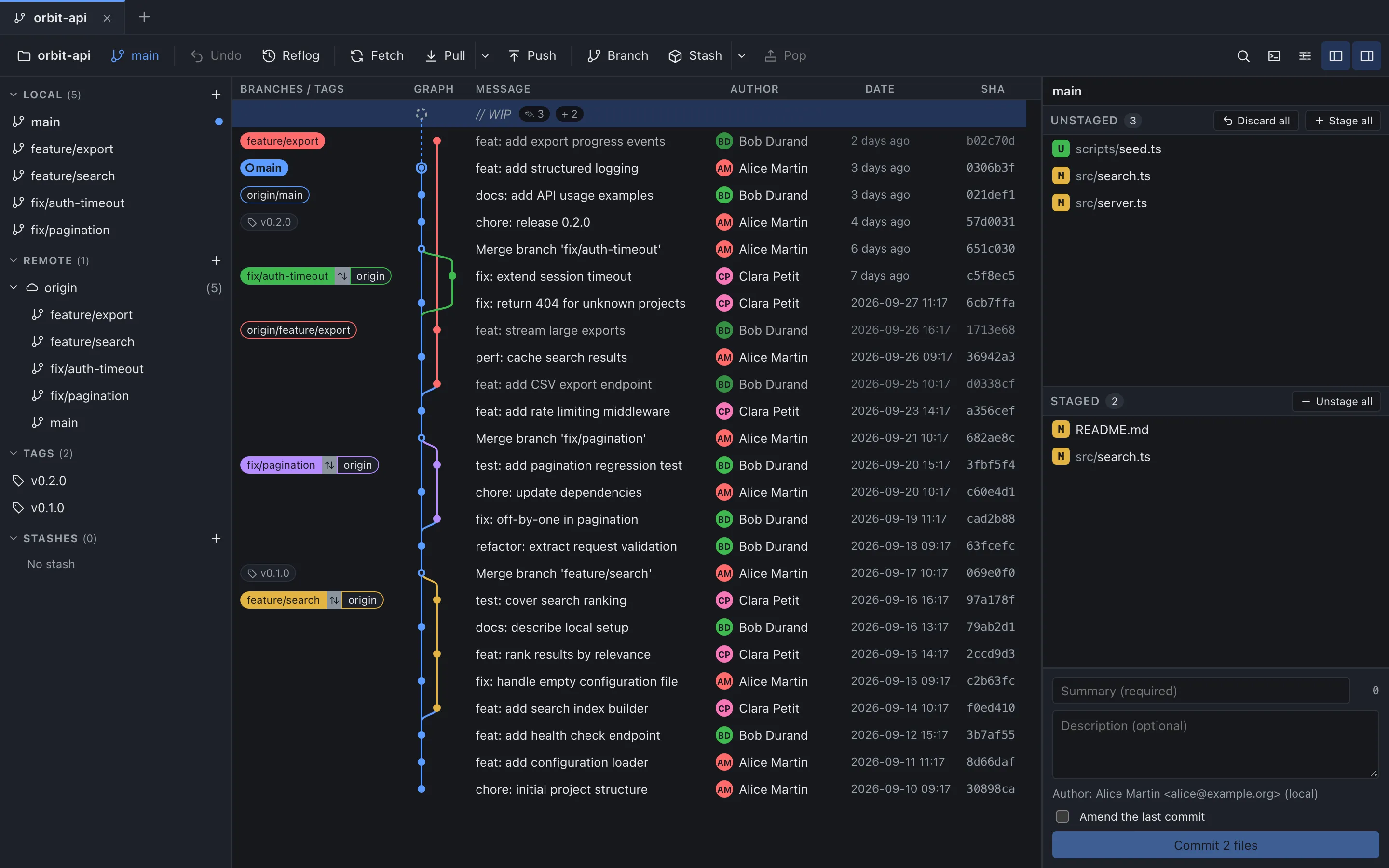
GitMini draws the same graph in a window. Its columns are “Branches / tags”, “Graph”, “Message”, “Author”, “Date” and “SHA” (the header displays them in capitals). The lines of the graph are coloured, and the label of a local branch takes the colour of its line. Local branches, remote branches and tags share one graph, so there is no --all to remember.
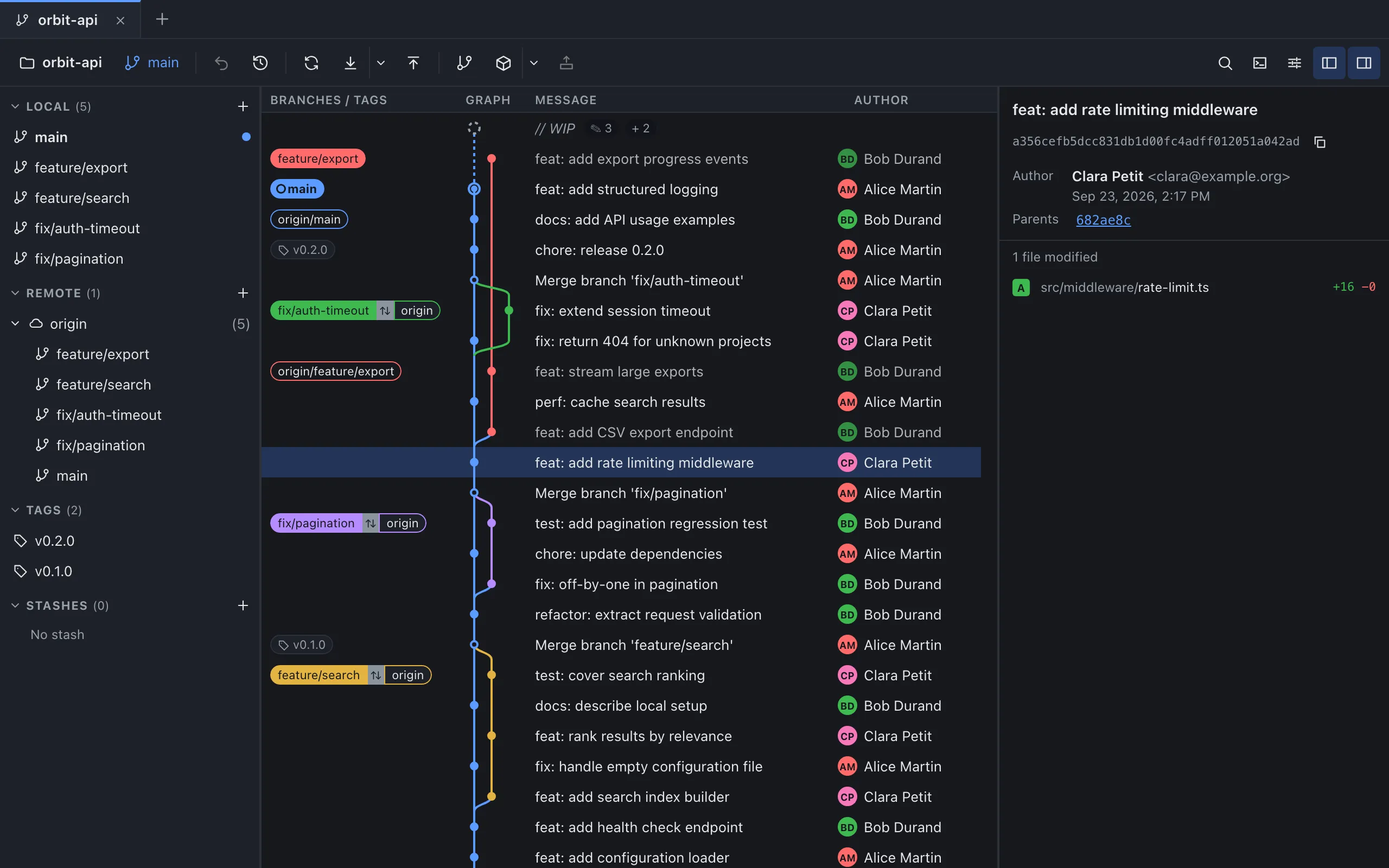
Click a commit and the right panel shows its SHA with a copy button, its author, its parents as links and the modified files with their added and removed lines. For a merge commit, a drop-down next to the parents, named “Compare to parent” for screen readers, chooses which parent the file list is compared with. The first parent is selected by default.
The search bar opens with Cmd+F on macOS or Ctrl+F elsewhere, or from the “Search” button (the magnifying glass) in the toolbar. Type part of a message, an author or sha: followed by an ID. The first match is selected as you type, Enter jumps to the next one and Shift+Enter to the previous one. The graph is not filtered, so you keep the context around each result.
You can also drag a branch label onto another branch. A menu offers a rebase of the dragged branch onto the other one if the dragged branch is local, and a merge into the other branch if that one is the current branch.
Use the terminal for a quick look or a script, and the graph when you browse many branches or open commits one after another.
Sources
- Git: git-log, consulted on October 4, 2026.
- Git: git-commit-graph, consulted on October 4, 2026.
- Git: gitrevisions, consulted on October 4, 2026.
- Git: gitglossary, consulted on October 4, 2026.
- GitMini product README, consulted on October 4, 2026.