Decide when to combine commits
To squash commits in Git is to meld several of them into one. It fits when a few commits are steps of the same change, such as a first attempt, a wip and a typo fix. Combined, they give a reviewer one coherent change instead of the story of how you got there. Ekino’s guide (in French) presents it as a way to keep a cleaner history, notably for pull requests.
Squash only commits that are yours. Combining commits rewrites them, so any commit already pushed needs a force push afterwards; the interactive rebase guide explains that risk. If you only want to fold new changes into the very last commit, amending it is simpler.
The example is a throwaway repository, orbit-api. The branch fix/pagination has three local commits, and the last two are noise:
git log --oneline --decoratee49e1b4 (HEAD -> fix/pagination) fix typo
cdead1f wip: handle the last page
12993ff fix: clamp page size
9fd61d6 (main) chore: init orbit-apiThe goal is one commit with the same files. Save a marker first, so you can compare afterwards, and note the tree hash. A tree hash identifies the exact content of the files at a commit:
git branch before-squash
git rev-parse HEAD^{tree}33c52f9998adf1e9846722a660d08529d2d67780Your IDs will differ, but the method is the same.
Select commits and start an interactive rebase
The base of the rebase is the commit before the first one you want to combine. For the last three commits, HEAD~3 does it:
git rebase -i HEAD~3Git lists the commits oldest first. Keep pick on the first line and change the other two to squash. This is the list I saved:
pick 12993ff fix: clamp page size
squash cdead1f wip: handle the last page
squash e49e1b4 fix typo
This list comes from Git 2.30; Git 2.54 shows each subject after a #, as in pick 12993ff # fix: clamp page size. squash melds a line into the one above it, so the first line must stay pick. If you squash it, Git stops with error: cannot 'squash' without a previous commit, and you fix the list with git rebase --edit-todo or abort. Pro Git shows the same operation for a list of commits.
In GitMini, right-click the first of the three commits and choose Interactive rebase from here…. Set the second and third commits to squash — merge (combined message). GitMini refuses a list that starts with a squash: “The first commit cannot be merged with a previous commit.”
Choose the message and verify the changes
After you save the list, Git opens an editor with the three messages combined. Everything not starting with # becomes the message, so replace it with the one you want:
# This is a combination of 3 commits.
# This is the 1st commit message:

fix: clamp page size

# This is the commit message #2:

wip: handle the last page

# This is the commit message #3:

fix typo

# Please enter the commit message for your changes. Lines starting
# with '#' will be ignored, and an empty message aborts the commit.
# …
I replaced it with fix: clamp page size and handle the last page. Git also prints a Rebasing (n/m) counter, left out here:
[detached HEAD ac08536] fix: clamp page size and handle the last page
 Date: Fri Sep 25 10:02:00 2026 +0000
 1 file changed, 9 insertions(+)
 create mode 100644 src/pagination.ts
Successfully rebased and updated refs/heads/fix/pagination.
Now compare with the marker:
git log --oneline --decorate
git rev-parse before-squash^{tree} HEAD^{tree}
git diff before-squash HEAD
ac08536 (HEAD -> fix/pagination) fix: clamp page size and handle the last page
9fd61d6 (main) chore: init orbit-api
33c52f9998adf1e9846722a660d08529d2d67780
33c52f9998adf1e9846722a660d08529d2d67780There is one commit, the two tree hashes are identical, and git diff prints nothing: the files did not change, only the history did.
fixup is the variant for commits whose message you do not want. In a second copy of the repository, I used fixup on lines two and three instead. No editor opened, because Git keeps the first message and discards the others, as Pro Git describes:
ea8c011 (HEAD -> fix/pagination) fix: clamp page size
9fd61d6 (main) chore: init orbit-api
Its tree hash was again 33c52f9998adf1e9846722a660d08529d2d67780. Use squash when the messages carry information worth keeping, and fixup for throwaway commits such as wip or fix typo.
GitMini builds the same choice into the list:
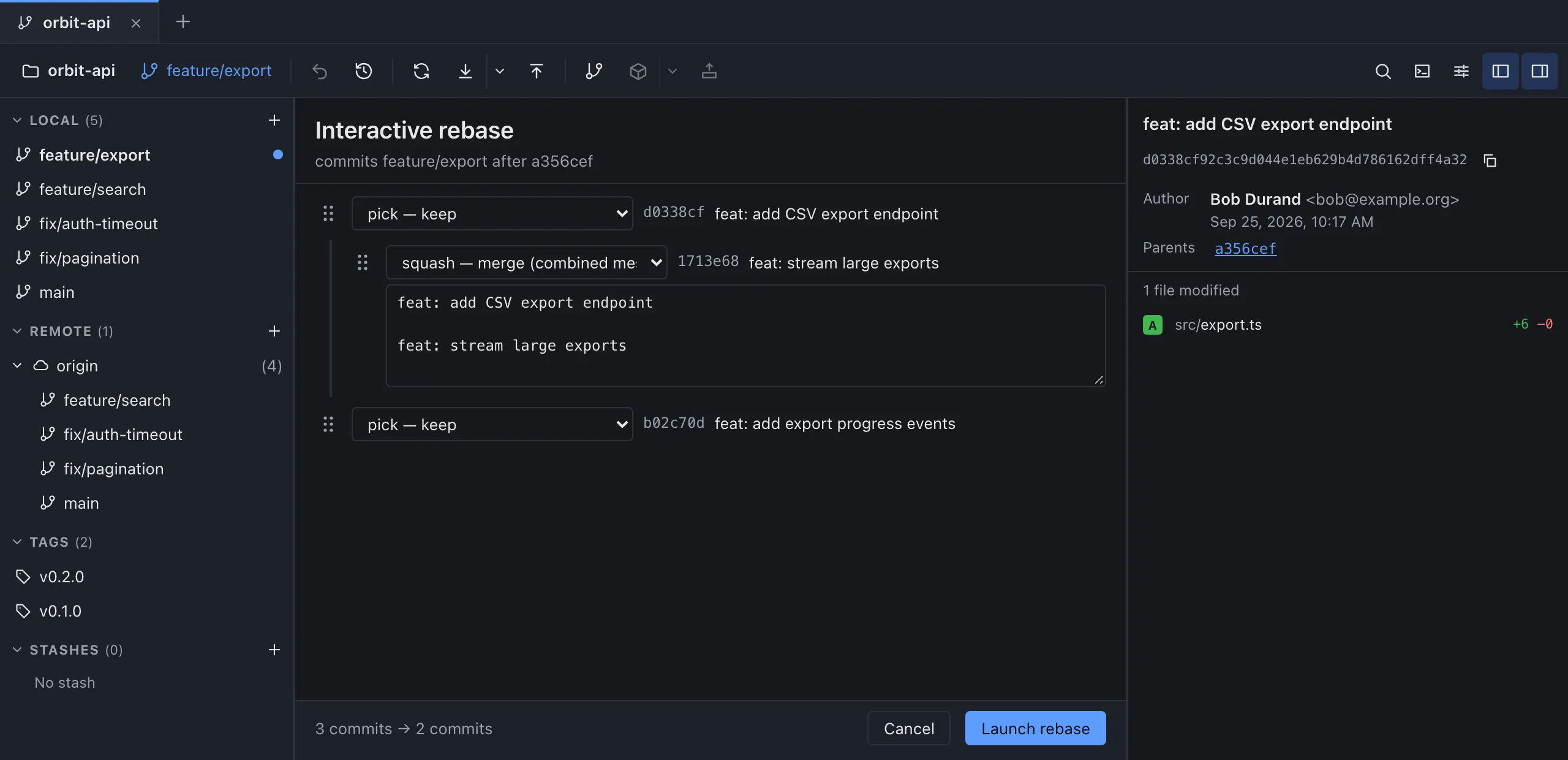
The last squash or fixup line of the group carries a text field, prefilled with the message of the first commit and those of its squash lines. A fixup line adds nothing to it. Edit the text, check the preview of the commit count, then click Launch rebase.
Distinguish local squash from squash merge
A local squash rewrites your branch. A squash merge is something else: when a pull request is merged, the platform can combine all its commits into a single commit on the base branch. GitHub describes it in its documentation: the commits are squashed into a single one, and the intermediate commits are not kept on the base branch. It happens on the base branch at merge time; the local equivalent below shows that the feature branch itself is left untouched.
Git has a local equivalent, git merge --squash. It prepares the combined changes without committing, as the git-merge documentation explains. In a third copy, on main:
git merge --squash fix/pagination
git commit -m "fix: paginate with a clamped page size"
git log --oneline --graph --decorate --all
* e49e1b4 (fix/pagination) fix typo
* cdead1f wip: handle the last page
* 12993ff fix: clamp page size
| * 8213c9e (HEAD -> main) fix: paginate with a clamped page size
|/
* 9fd61d6 chore: init orbit-apimain gets one new commit, and fix/pagination still has its three. The tree hash of main is again 33c52f9998adf1e9846722a660d08529d2d67780.
GitMini’s merge dialog offers three modes: Fast forward if possible, Always create a merge commit and Fast-forward only. It has no squash merge option. To land a single commit on main from GitMini, squash the branch with the interactive rebase first, as above, then merge it: if main has not moved, Fast forward if possible adds just that commit. For the merge itself, see merge or rebase.
Sources
- Pro Git: Rewriting History, consulted on October 4, 2026.
- Ekino: Comment « squasher » efficacement ses commits avec Git (in French), consulted on October 4, 2026.
- GitHub Docs: pull request merges, consulted on October 4, 2026.
- Git documentation: git-merge, consulted on October 4, 2026.
- GitMini product README, consulted on October 4, 2026.