Separate two changes in the same file
Git add patch mode, started with git add -p (long form git add --patch), stages only some parts of a file. It is the tool for the day you fix two unrelated things in the same file and want one commit for each. If the index is new to you, start with the guide to git add and staging.
In the orbit-api repository, you edited src/search.ts twice: you made buildIndex skip empty tokens, and you made search hide archived projects. Ask Git for the diff:
git diffdiff --git a/src/search.ts b/src/search.ts
index 24c85be..87aea95 100644
--- a/src/search.ts
+++ b/src/search.ts
@@ -8,6 +8,7 @@ export function buildIndex(projects: Project[]): Map<string, Project[]> {
const index = new Map<string, Project[]>();
for (const project of projects) {
for (const token of project.name.toLowerCase().split(/\s+/)) {
+ if (token === "") continue;
const bucket = index.get(token) ?? [];
bucket.push(project);
index.set(token, bucket);
@@ -23,5 +24,7 @@ export function search(index: Map<string, Project[]>, query: string): Project[]
hits.set(project.id, project);
}
}
- return [...hits.values()].sort((a, b) => a.name.localeCompare(b.name));
+ return [...hits.values()]
+ .filter((hit) => !hit.archived)
+ .sort((a, b) => a.name.localeCompare(b.name));
}Git cut the diff into two hunks. A hunk is a block of neighboring changes with a few unchanged lines around it, and each one starts with a header between @@ markers. Here the first hunk is the buildIndex change and the second is the search change. Hunks are the unit that git add -p offers you.
Choose hunks with git add -p
Run the command on the file. Git shows one hunk at a time and asks what to do with it:
git add -p src/search.tsdiff --git a/src/search.ts b/src/search.ts
index 24c85be..87aea95 100644
--- a/src/search.ts
+++ b/src/search.ts
@@ -8,6 +8,7 @@ export function buildIndex(projects: Project[]): Map<string, Project[]> {
const index = new Map<string, Project[]>();
for (const project of projects) {
for (const token of project.name.toLowerCase().split(/\s+/)) {
+ if (token === "") continue;
const bucket = index.get(token) ?? [];
bucket.push(project);
index.set(token, bucket);
Stage this hunk [y,n,q,a,d,j,J,g,/,e,?]? y
@@ -23,5 +24,7 @@ export function search(index: Map<string, Project[]>, query: string): Project[]
hits.set(project.id, project);
}
}
- return [...hits.values()].sort((a, b) => a.name.localeCompare(b.name));
+ return [...hits.values()]
+ .filter((hit) => !hit.archived)
+ .sort((a, b) => a.name.localeCompare(b.name));
}
Stage this hunk [y,n,q,a,d,K,g,/,e,?]? nThe answers typed here are y for the first hunk and n for the second. This transcript comes from Git 2.23. Recent versions, checked with Git 2.54, start the prompt with a counter and offer a few more keys, as in (1/2) Stage this hunk [y,n,q,a,d,k,K,j,J,g,/,e,p,P,?]?; the choices and the resulting index are the same. The keys you will use most:
ystages the hunk,nskips it.qquits without staging the current hunk or the remaining ones.astages the current hunk and every later hunk in the file, whiledskips the current hunk and every later one.ssplits the current hunk into smaller ones, when it contains changes separated by unchanged lines.elets you edit the hunk by hand.?prints the help.
The prompt lists only the keys available for the current hunk, which is why s is missing above: each of these hunks holds a single change and cannot be split. On another file, a hunk with two nearby changes offers s, and answering it prints Split into 2 hunks. before showing the first half. In a script, printf 'y\nn\n' | git add -p src/search.ts supplies the same two answers.
Check staged and remaining changes
The file now has changes in two places:
git statusOn branch main
Changes to be committed:
(use "git restore --staged <file>..." to unstage)
modified: src/search.ts
Changes not staged for commit:
(use "git add <file>..." to update what will be committed)
(use "git restore <file>..." to discard changes in working directory)
modified: src/search.tssrc/search.ts appears twice, once per place. git diff --cached shows what the next commit will contain, and it is only the first hunk:
git diff --cacheddiff --git a/src/search.ts b/src/search.ts
index 24c85be..e6eaa83 100644
--- a/src/search.ts
+++ b/src/search.ts
@@ -8,6 +8,7 @@ export function buildIndex(projects: Project[]): Map<string, Project[]> {
const index = new Map<string, Project[]>();
for (const project of projects) {
for (const token of project.name.toLowerCase().split(/\s+/)) {
+ if (token === "") continue;
const bucket = index.get(token) ?? [];
bucket.push(project);
index.set(token, bucket);The guide to git diff --staged compares this output with the plain git diff. Commit, then look at what remains:
git commit -m "Skip empty tokens when building the index"
git status -s
[main 5485416] Skip empty tokens when building the index
1 file changed, 1 insertion(+)
M src/search.tsThe commit holds one added line. The search change is still in your working tree, listed as modified and not staged, ready for its own commit. Your commit identifiers will differ from the ones shown here.
Select hunks visually in GitMini
GitMini offers the same choice without the prompt. Click src/search.ts in the Unstaged list: its diff opens in the middle of the window, with an Unstaged label and the number of added and removed lines. Every hunk has its header, like @@ -8,7 +8,7 @@, and two buttons: Stage hunk and Discard hunk.
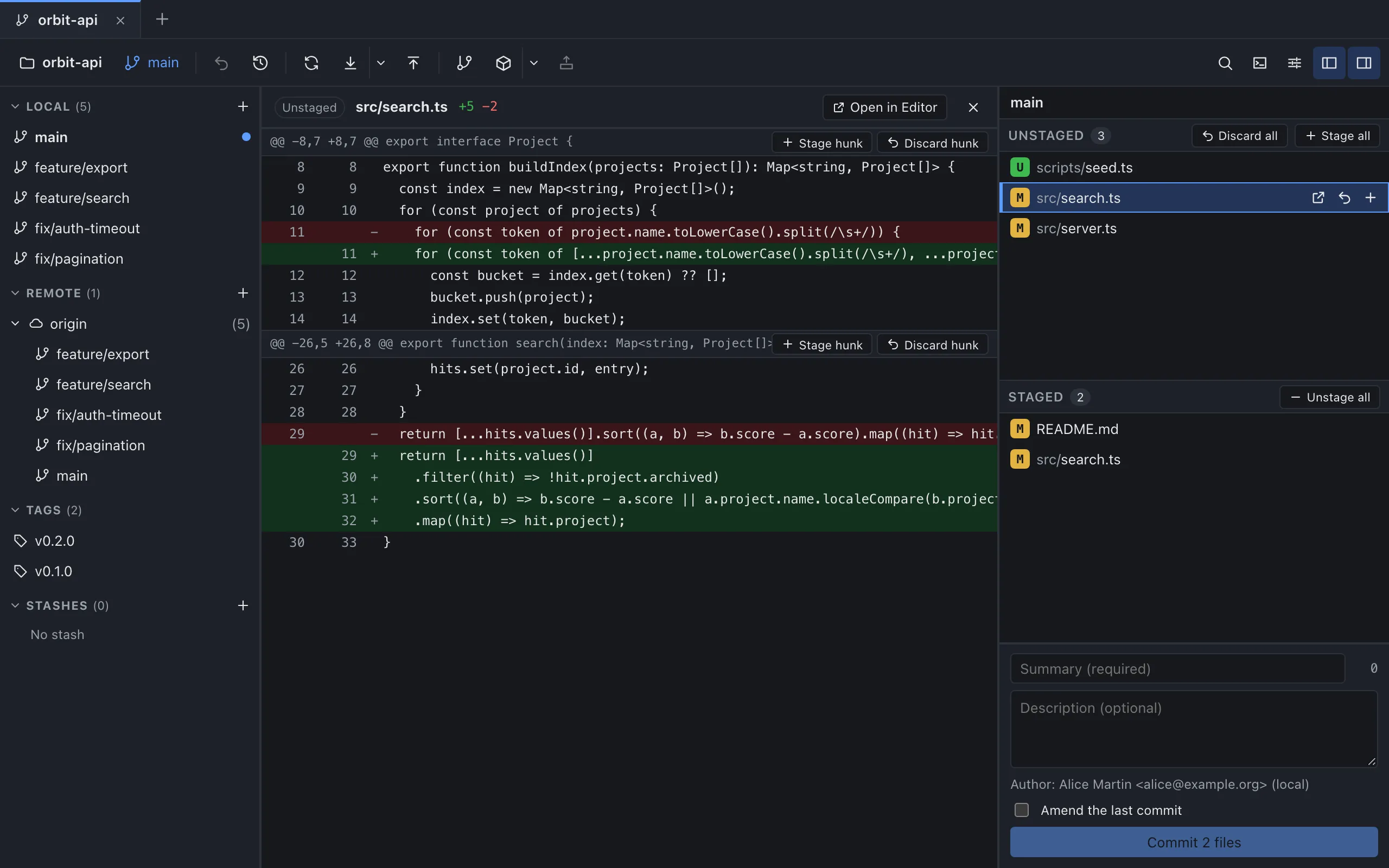
Click Stage hunk on the first block to move it to the index. The file now appears in both lists, Staged and Unstaged, just like the two sections of git status above. Open it from Staged and the same block shows an Unstage hunk button instead, which takes it back out of the index. The commit button counts files, so it reads Commit 1 file even though only one hunk of that file is staged.
The unit is the hunk. GitMini stages, unstages or discards a whole block at a time, as it is displayed, and the block buttons are available on text files. Discard hunk removes the block from your working tree and asks for confirmation first: it warns that the changes cannot be restored from the app. When only the second block is left in Unstaged, you have reached the same state as the terminal session above.
Sources
- Git documentation: git-add, consulted on October 4, 2026.
- Pro Git: Interactive Staging, consulted on October 4, 2026.
- GitMini product README, consulted on October 4, 2026.