Distinguish git diff and git diff –staged
Git keeps three versions of every tracked file: the one in the last commit, the one in the index, and the one in your working tree. Two commands compare them. git diff compares the working tree with the index: the changes you could still stage. git diff --staged compares the index with the last commit: the changes your next commit will contain. --cached does the same thing: the Git documentation calls --staged a synonym of it. If the index is new to you, the guide to git add and staging explains it first.
The examples use orbit-api. You changed src/search.ts in two places and, with git add -p, staged only the first one. Here is what the two commands print. The outputs come from Git 2.23; Git 2.30 and 2.54 print the same text.
git diffdiff --git a/src/search.ts b/src/search.ts
index e6eaa83..87aea95 100644
--- a/src/search.ts
+++ b/src/search.ts
@@ -24,5 +24,7 @@ export function search(index: Map<string, Project[]>, query: string): Project[]
hits.set(project.id, project);
}
}
- return [...hits.values()].sort((a, b) => a.name.localeCompare(b.name));
+ return [...hits.values()]
+ .filter((hit) => !hit.archived)
+ .sort((a, b) => a.name.localeCompare(b.name));
}git diff --stageddiff --git a/src/search.ts b/src/search.ts
index 24c85be..e6eaa83 100644
--- a/src/search.ts
+++ b/src/search.ts
@@ -8,6 +8,7 @@ export function buildIndex(projects: Project[]): Map<string, Project[]> {
const index = new Map<string, Project[]>();
for (const project of projects) {
for (const token of project.name.toLowerCase().split(/\s+/)) {
+ if (token === "") continue;
const bucket = index.get(token) ?? [];
bucket.push(project);
index.set(token, bucket);The two outputs contain different blocks. git diff shows the search change that is not staged, and git diff --staged shows the buildIndex change that is. git diff --cached prints exactly the same text as git diff --staged. Plain git diff has a limit worth knowing: it never lists an untracked file. A new file only appears in git diff --staged after you git add it.
Read additions, deletions and context
Take the output of git diff above and read it from the top:
diff --git a/src/search.ts b/src/search.tsnames the file being compared.index e6eaa83..87aea95 100644gives the abbreviated IDs of the two versions: the one in the index, then the one in your working tree.--- a/src/search.tsand+++ b/src/search.tslabel the old and the new side.@@ -24,5 +24,7 @@opens a block. On the old side it covers 5 lines starting at line 24, and on the new side 7 lines starting at line 24. The text after it, here the signature ofsearch, is a nearby line that helps you locate the block.- A line starting with
-was removed. A line starting with+was added. A line starting with a space is context: unchanged, shown so you can see where the change sits.
In this block, one line was removed and three were added, which explains the jump from 5 to 7 lines. A modified line always shows up as a - line followed by its + replacement.
Line numbers depend on what you compare. git diff HEAD compares the working tree with the last commit, so it prints both blocks, and it writes the header of the second one as @@ -23,5 +24,7 @@. In plain git diff, the old side is the index, which already holds the line added by the first block, so the same block starts at line 24 on both sides.
Recognize a partially staged file
git status -s tells you at a glance:
git status -sMM src/search.tsThe first column describes the index and the second the working tree. MM means the file is modified in both: some of it is staged, and some of it is not. A file shown as M is fully staged, and one shown as M has nothing staged. To measure each side, compare the summaries:
git diff --cached --stat
git diff --stat
src/search.ts | 1 +
1 file changed, 1 insertion(+)
src/search.ts | 4 +++-
1 file changed, 3 insertions(+), 1 deletion(-)The first summary is the staged part: one added line. The second is what remains: one line removed and three added. Look back at the index lines of the two diffs. git diff --staged ended at e6eaa83, and git diff starts from that same e6eaa83: it is the staged version of the file, sitting between the committed one (24c85be) and the one on your disk (87aea95).
Review the next commit in GitMini
GitMini keeps the same two views apart. Each diff has a source label in its header, and the two that matter here are Staged and Unstaged. Staged compares the last commit with the index, like git diff --staged. Unstaged compares the index with your working tree, like git diff.
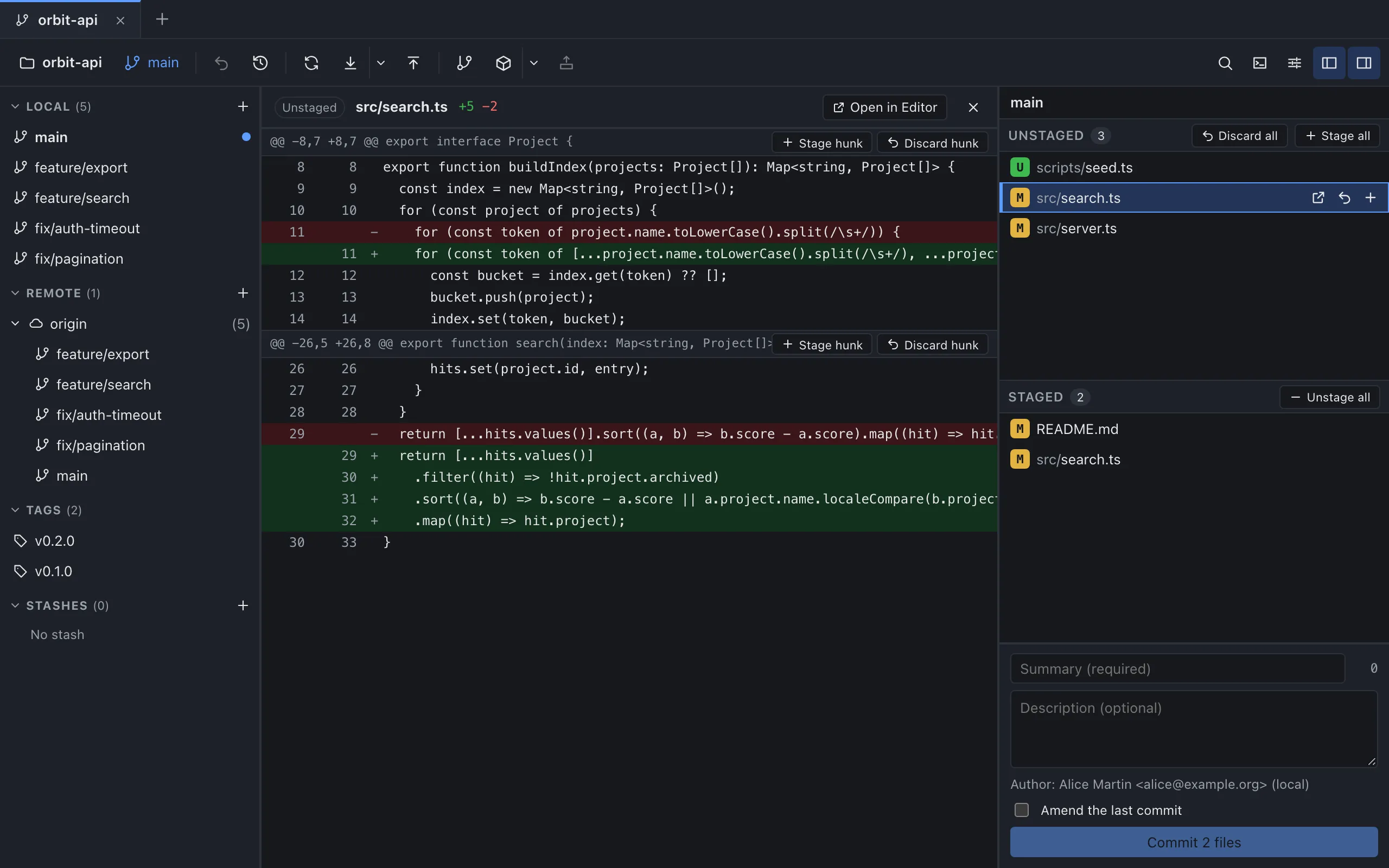
Click a file in the Staged list to open its Staged diff, and a file in the Unstaged list to open its Unstaged one. A partially staged file is listed in both, so you can open each side from its own list, as in the screenshot. The header also shows the counts of added and removed lines, such as +5 −2. When nothing is left on one side, GitMini says so: “No staged changes remain for this file.” or “No unstaged changes remain for this file.”
The block buttons follow the source. In an Unstaged diff, each block offers Stage hunk and Discard hunk. In a Staged diff, it offers Unstage hunk. In the terminal, the matching tool is git add -p. Once you commit, the same file opens from the commit details with a Commit label, and the guide to git show covers the terminal equivalent.
Sources
- Git documentation: git-diff, consulted on October 4, 2026.
- Pro Git: Interactive Staging, consulted on October 4, 2026.
- GitMini product README, consulted on October 4, 2026.