Understand the –oneline format
A plain git log spends several lines on each commit. git log --oneline spends one. The git log documentation defines --oneline as a shorthand for --pretty=oneline --abbrev-commit used together: the commit ID and its message on a single line, with the ID cut to a prefix that still names the commit uniquely.
To compare the formats, build a throwaway repository. It is the one from the git log –graph guide, so skip the setup if you already have it. The dates are fixed, so these exact commands give the same IDs as the outputs below. Change anything and yours will differ. The outputs come from Git 2.23 and are identical on Git 2.30 and 2.54.
mkdir demo-log && cd demo-log
git init
git config user.name "Example Dev"
git config user.email [email protected]
commit_at() { git add . && GIT_AUTHOR_DATE="$1" GIT_COMMITTER_DATE="$1" git commit -q -m "$2"; }

echo "# Demo" > README.md && commit_at 2026-09-01T10:00:00+0000 "Add README"
git branch -M main
echo "start" > app.txt && commit_at 2026-09-02T10:00:00+0000 "Add app skeleton"
echo "port=8080" > config.txt && commit_at 2026-09-03T10:00:00+0000 "Add default config"

git checkout -b feature
echo "search" >> app.txt && commit_at 2026-09-05T10:00:00+0000 "Add search option"
echo "search ok" > tests.txt && commit_at 2026-09-09T10:00:00+0000 "Add search tests"

git checkout main
git checkout -b docs
echo "# Demo guide" > README.md && echo "TODO" > guide.txt && commit_at 2026-09-06T10:00:00+0000 "Draft user guide"

git checkout main
echo "# Demo app" > README.md && commit_at 2026-09-08T10:00:00+0000 "Rename project title"
echo "port=9000" > config.txt && commit_at 2026-09-10T10:00:00+0000 "Change default port"
GIT_AUTHOR_DATE=2026-09-12T10:00:00+0000 GIT_COMMITTER_DATE=2026-09-12T10:00:00+0000 git merge feature --no-edit -m "Merge branch 'feature'"
Here are the three newest commits, first with the full ID, then with --oneline:
git log --pretty=oneline -n 3e6d515ee0fe2be9bcedf2c17df09d1f89e06c799 Merge branch 'feature'
d2422638c75fcc7bae1bcc7a041d5a99d66cead8 Change default port
c7bfac7154d36e606685f5b1e10a43a2e5ba7b96 Add search testsgit log --oneline -n 3e6d515e Merge branch 'feature'
d242263 Change default port
c7bfac7 Add search tests-n 3 limits the output to the first three commits. The abbreviated ID is enough for other commands, which is how you will open a commit at the end of this guide. If you want a longer prefix, --abbrev=<n> sets its minimum length.
Add the graph and branch references
--graph draws the lines between commits, and --decorate prints the names of the refs that point at the commits shown. With --oneline, they make a compact graph. The graph below is the real output of the command. The notes after <-- are not printed by Git: they are added by hand to explain each line.
git log --oneline --graph --decorate* e6d515e (HEAD -> main) Merge branch 'feature' <-- abbreviated ID, refs, message
|\ <-- the merge has two parents
| * c7bfac7 (feature) Add search tests <-- tip of feature
| * b13288d Add search option
* | d242263 Change default port <-- main's side
* | 3dc02d2 Rename project title
|/ <-- both lines meet again
* ccb94c7 Add default config <-- common ancestor
* 9cfbfd0 Add app skeleton
* 3d7dc15 Add README <-- root commitEvery line follows the same pattern: the graph characters, the abbreviated ID, the refs in parentheses when a ref points there, then the message. HEAD -> main means HEAD is on main, and (feature) marks the tip of feature. The refs are what let you find your place again after a cut, so keep --decorate in every variant below.
The documentation gives --decorate a default of auto: names are shown when the output goes to a terminal, unless log.decorate is configured. The outputs on this page are captured without a terminal, which is why the flag is spelled out. In your terminal, the parentheses usually appear even without it.
Limit output while keeping useful context
Each limit hides something. Know what, and the compact view stays readable.
By count. -n 5 keeps the first five commits that would be shown:
git log --oneline --graph --decorate -n 5* e6d515e (HEAD -> main) Merge branch 'feature'
|\
| * c7bfac7 (feature) Add search tests
| * b13288d Add search option
* | d242263 Change default port
* | 3dc02d2 Rename project title
|/The cut falls before the common ancestor, so the closing |/ is a line that continues out of view.
By date. --since shows commits more recent than a date. Give the time and the time zone as well. In tests on Git 2.23, 2.30 and 2.54, a bare --since=2026-09-09 was completed with the current time of day, so the result depended on the time of day you ran the command. The explicit form below always gives the same result:
git log --oneline --graph --decorate --since="2026-09-09 00:00 +0000"* e6d515e (HEAD -> main) Merge branch 'feature'
|\
| * c7bfac7 (feature) Add search tests
* d242263 Change default portBy path. After --, Git keeps only the commits that explain how the matching files came to be:
git log --oneline --decorate -- config.txtd242263 Change default port
ccb94c7 Add default configWith --graph, Git also rewrites parent links so the remaining commits connect. For app.txt, that gives a straight line without the merge, because only the commits that explain that file remain:
git log --oneline --graph --decorate -- app.txt* b13288d Add search option
* 9cfbfd0 Add app skeletonBy line of history. --first-parent follows only the first parent at each merge. The commits of feature disappear, but the merge commit still shows that they arrived:
git log --oneline --decorate --first-parente6d515e (HEAD -> main) Merge branch 'feature'
d242263 Change default port
3dc02d2 Rename project title
ccb94c7 Add default config
9cfbfd0 Add app skeleton
3d7dc15 Add READMEInspect a commit in detail
The compact view tells you what happened, not what changed. Take an abbreviated ID from it and give it to git show:
git show --stat --oneline c7bfac7c7bfac7 Add search tests
tests.txt | 1 +
1 file changed, 1 insertion(+)--stat replaces the diff with a summary of the changed files. Drop it to read the full diff. The git show guide covers the message, the author, a single file and merge commits.
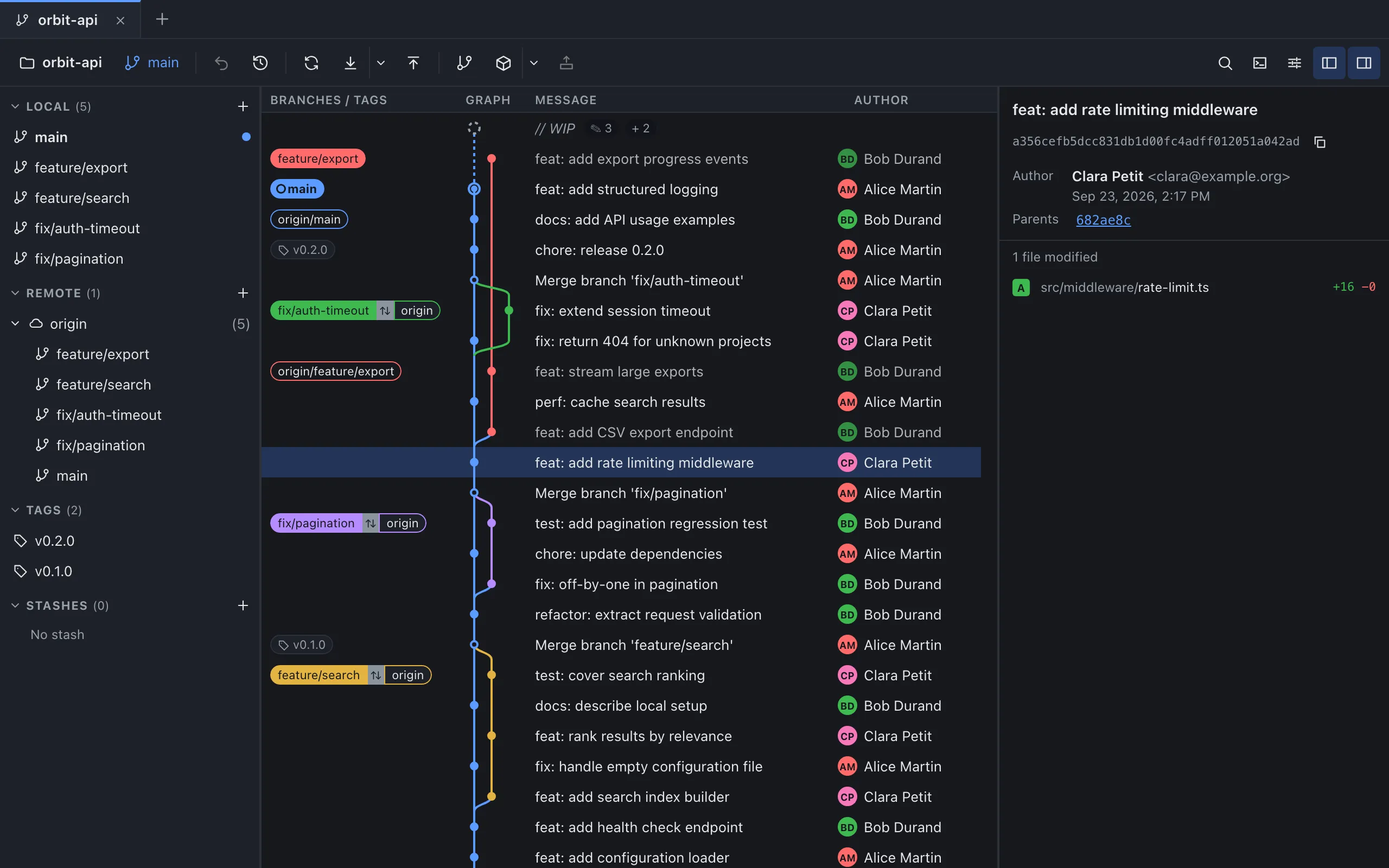
GitMini shows the same fields as columns: “Branches / tags”, “Graph”, “Message”, “Author”, “Date” and “SHA” (displayed in capitals; in a narrow window, SHA, Date and Author drop out, in that order). Click a row and the right panel opens that commit with its SHA, author, parents and modified files, with the lines added and removed for each file.
Sources
- Git: git-log, consulted on October 4, 2026.
- GitMini product README, consulted on October 4, 2026.