Select a commit by its ID
git show displays one commit: its message, its author and date, and the changes it made. The git show documentation says that for commits it shows the log message and the textual diff, and that the object defaults to HEAD. A bare git show is therefore the quickest way to re-read your last commit.
To try every case, build a throwaway repository. It is the one from the git log –graph guide, and git log --oneline --graph --decorate --all lists its IDs. The dates are fixed, so these exact commands give the same IDs as the outputs below. Change anything and yours will differ. The outputs come from Git 2.23 and are identical on Git 2.30 and 2.54.
mkdir demo-log && cd demo-log
git init
git config user.name "Example Dev"
git config user.email [email protected]
commit_at() { git add . && GIT_AUTHOR_DATE="$1" GIT_COMMITTER_DATE="$1" git commit -q -m "$2"; }

echo "# Demo" > README.md && commit_at 2026-09-01T10:00:00+0000 "Add README"
git branch -M main
echo "start" > app.txt && commit_at 2026-09-02T10:00:00+0000 "Add app skeleton"
echo "port=8080" > config.txt && commit_at 2026-09-03T10:00:00+0000 "Add default config"

git checkout -b feature
echo "search" >> app.txt && commit_at 2026-09-05T10:00:00+0000 "Add search option"
echo "search ok" > tests.txt && commit_at 2026-09-09T10:00:00+0000 "Add search tests"

git checkout main
git checkout -b docs
echo "# Demo guide" > README.md && echo "TODO" > guide.txt && commit_at 2026-09-06T10:00:00+0000 "Draft user guide"

git checkout main
echo "# Demo app" > README.md && commit_at 2026-09-08T10:00:00+0000 "Rename project title"
echo "port=9000" > config.txt && commit_at 2026-09-10T10:00:00+0000 "Change default port"
GIT_AUTHOR_DATE=2026-09-12T10:00:00+0000 GIT_COMMITTER_DATE=2026-09-12T10:00:00+0000 git merge feature --no-edit -m "Merge branch 'feature'"
You can name a commit by an abbreviated ID, by a branch name, or relative to another commit. As gitrevisions explains, ~ goes to the first parent and ^2 to the second parent of a merge. Here -s hides the diff so that three commits fit on three lines:
git show -s --oneline docs HEAD~1 HEAD^2f8fe6dd Draft user guide
d242263 Change default port
c7bfac7 Add search testsdocs is the tip of that branch, HEAD~1 is the commit before HEAD, and HEAD^2 is the second parent of the merge at HEAD, the tip of feature.
Read the message, author and diff
Open the commit on docs by its ID:
git show f8fe6ddcommit f8fe6ddd48803a18e92e75b5084b77b78ef061c1
Author: Example Dev <[email protected]>
Date: Sun Sep 6 10:00:00 2026 +0000
Draft user guide
diff --git a/README.md b/README.md
index 0805455..711fd5a 100644
--- a/README.md
+++ b/README.md
@@ -1 +1 @@
-# Demo
+# Demo guide
diff --git a/guide.txt b/guide.txt
new file mode 100644
index 0000000..1333ed7
--- /dev/null
+++ b/guide.txt
@@ -0,0 +1 @@
+TODOThe header gives the full ID, the author and the date. The message follows, indented. Then comes one block per file: diff --git names it, new file mode flags an added file, and each @@ line locates the changed lines. A - line was removed and a + line was added. Here the title in README.md changed and guide.txt was created.
For a summary instead of the patch, add --stat:
git show --stat --oneline f8fe6ddf8fe6dd Draft user guide
README.md | 2 +-
guide.txt | 1 +
2 files changed, 2 insertions(+), 1 deletion(-)git show reads a commit that already exists. To review what your next commit will contain, use git diff --staged instead, as in the guide to reviewing staged changes.
Limit output to one file
The git show page does not document a path form, but the command takes the same path limiting as git log, whose synopsis ends with [[--] <path>...]. Everything after -- is a path, and only the matching diffs remain:
git show f8fe6dd -- guide.txtcommit f8fe6ddd48803a18e92e75b5084b77b78ef061c1
Author: Example Dev <[email protected]>
Date: Sun Sep 6 10:00:00 2026 +0000
Draft user guide
diff --git a/guide.txt b/guide.txt
new file mode 100644
index 0000000..1333ed7
--- /dev/null
+++ b/guide.txt
@@ -0,0 +1 @@
+TODOThe message and the header stay, and README.md is gone from the diff. The same filter works with --stat.
Understand the merge commit case
Now show the merge at HEAD:
git show HEADcommit e6d515ee0fe2be9bcedf2c17df09d1f89e06c799
Merge: d242263 c7bfac7
Author: Example Dev <[email protected]>
Date: Sat Sep 12 10:00:00 2026 +0000
Merge branch 'feature'The Merge: line lists the two parents: the previous tip of main, then the tip of feature. There is no diff. According to the documentation, git show presents a merge in the format produced by git diff-tree --cc. In that format, -c lists only files modified from all parents, and --cc also omits hunks where the result picks one parent’s version unchanged. This merge had no conflict, so it adds nothing of its own.
To see what the merge brought in, compare it with one parent. --first-parent diffs against the first one:
git show --first-parent --stat --oneline HEADe6d515e Merge branch 'feature'
app.txt | 1 +
tests.txt | 1 +
2 files changed, 2 insertions(+)-m prints one diff per parent, each labelled with from:
git show -m --stat --oneline HEADe6d515e (from d242263) Merge branch 'feature'
app.txt | 1 +
tests.txt | 1 +
2 files changed, 2 insertions(+)
e6d515e (from c7bfac7) Merge branch 'feature'
README.md | 2 +-
config.txt | 2 +-
2 files changed, 2 insertions(+), 2 deletions(-)The first block is what feature added to main. The second is what main had that feature lacked. The current documentation also lists --diff-merges=<format>. Git 2.23 rejects it and Git 2.30 accepts only off, while Git 2.54 accepts every listed format, so this guide sticks to --first-parent and -m, which print the same output on all three.
A combined diff gets content when the merge changes something itself. Merge docs into main in the same shell, so commit_at is still defined. Both branches changed the first line of README.md, so Git stops on a conflict, and you write the resolution:
git merge docs
echo "# Demo app guide" > README.md
commit_at 2026-09-14T10:00:00+0000 "Merge branch 'docs'"
git show
commit 642fd7f4e852c5dbd0e645e7e990aa7328f3b368
Merge: e6d515e f8fe6dd
Author: Example Dev <[email protected]>
Date: Mon Sep 14 10:00:00 2026 +0000
Merge branch 'docs'
diff --cc README.md
index 28e9d7d,711fd5a..ff68dd3
--- a/README.md
+++ b/README.md
@@@ -1,1 -1,1 +1,1 @@@
- # Demo app
-# Demo guide
++# Demo app guide@@@ has three @ because there are two parents. As the git diff documentation explains, each line has one prefix column per parent: a - in column N means the line was in parent N but not in the result, and a + means the result has a line that parent lacks. So # Demo app came from main, # Demo guide from docs, and # Demo app guide is new in the merge. For the bigger picture of merges, see merge or rebase.
GitMini shows the same details in the right panel when you click a commit: SHA, author, parents as links, and the modified files, each with its added and removed lines.
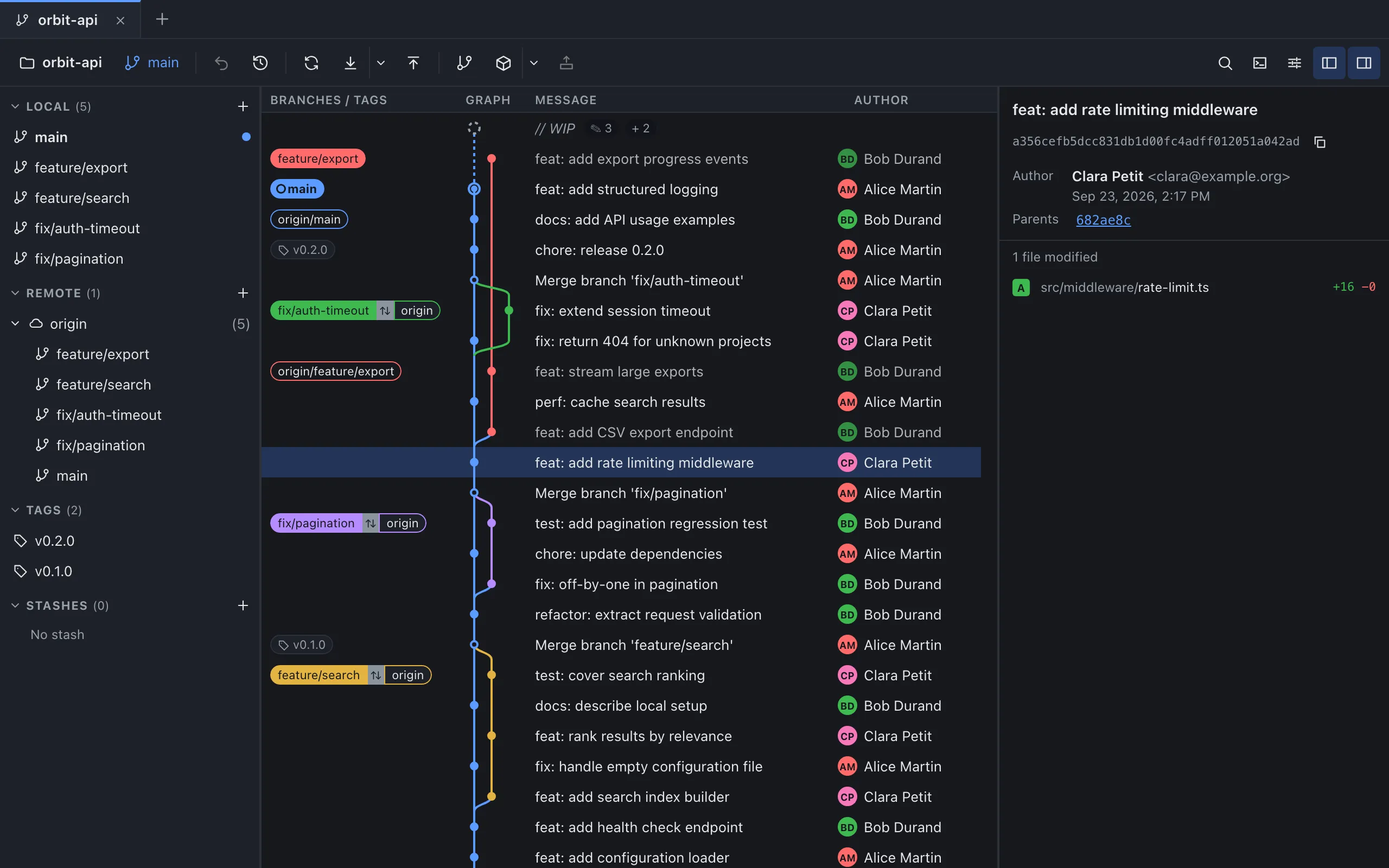
For a merge commit, a drop-down next to the parents, named “Compare to parent” for screen readers, lists “Parent 1” and “Parent 2” with their IDs, as in “Parent 1 — d242263”. The file list is computed against one parent at a time, the first by default, like --first-parent. Select the second to see the other side, like the second block of -m.
Sources
- Git: git-show, consulted on October 4, 2026.
- Git: git-log, consulted on October 4, 2026.
- Git: git-diff-tree, consulted on October 4, 2026.
- Git: git-diff, consulted on October 4, 2026.
- Git: gitrevisions, consulted on October 4, 2026.
- GitMini product README, consulted on October 4, 2026.