Check dependencies between commits
Git can reorder commits with an interactive rebase, and moving a line is easy. Doing it without breaking anything depends on one question: does a commit build on the lines of another? Two commits that touch different files can almost always swap. Two commits that touch the same lines cannot.
The example is a throwaway repository, orbit-api. The branch feature/retry has three commits on top of main. This command lists the files each one touches, oldest first:
git log --reverse --oneline --decorate --name-only main..8864acb docs: describe the retry option
README.md
6298bfd feat: add retry option
src/config.ts
ab7f160 (HEAD -> feature/retry) feat: raise retries to 5
src/config.tsThe docs commit touches only README.md, so it is independent. The last two both edit src/config.ts, and the third changes the line the second added. Git only checks text, not meaning: a commit that calls a function added by an earlier one in another file would reorder without any conflict and leave a broken commit in between. Read the commits, not just the file names.
Before you start, leave a marker on the current tip, so you can compare and go back. Your IDs will differ from the ones below.
git branch startChange the interactive rebase order
Start an interactive rebase from main. The interactive rebase guide covers the editor in detail:
git rebase -i mainGit lists the commits oldest first. In the example, the docs describe the retry option, so they should come after the commit that adds it. Move the docs line below the feat line, as Pro Git shows for reordering:
pick 6298bfd feat: add retry option
pick 8864acb docs: describe the retry option
pick ab7f160 feat: raise retries to 5
After you save, Git replays the commits in that order and prints Successfully rebased and updated refs/heads/feature/retry. The commits now have new IDs:
| Commit | Before | After |
|---|---|---|
feat: add retry option |
6298bfd |
bde2a75 |
docs: describe the retry option |
8864acb |
cc83efc |
feat: raise retries to 5 |
ab7f160 |
ef3db49 |
Why did the last one change when it did not move? A commit ID covers its parent’s ID. The third commit now sits on a different parent, so it gets a new ID even though its changes are the same. Every commit from the first moved one up to the tip is rewritten.
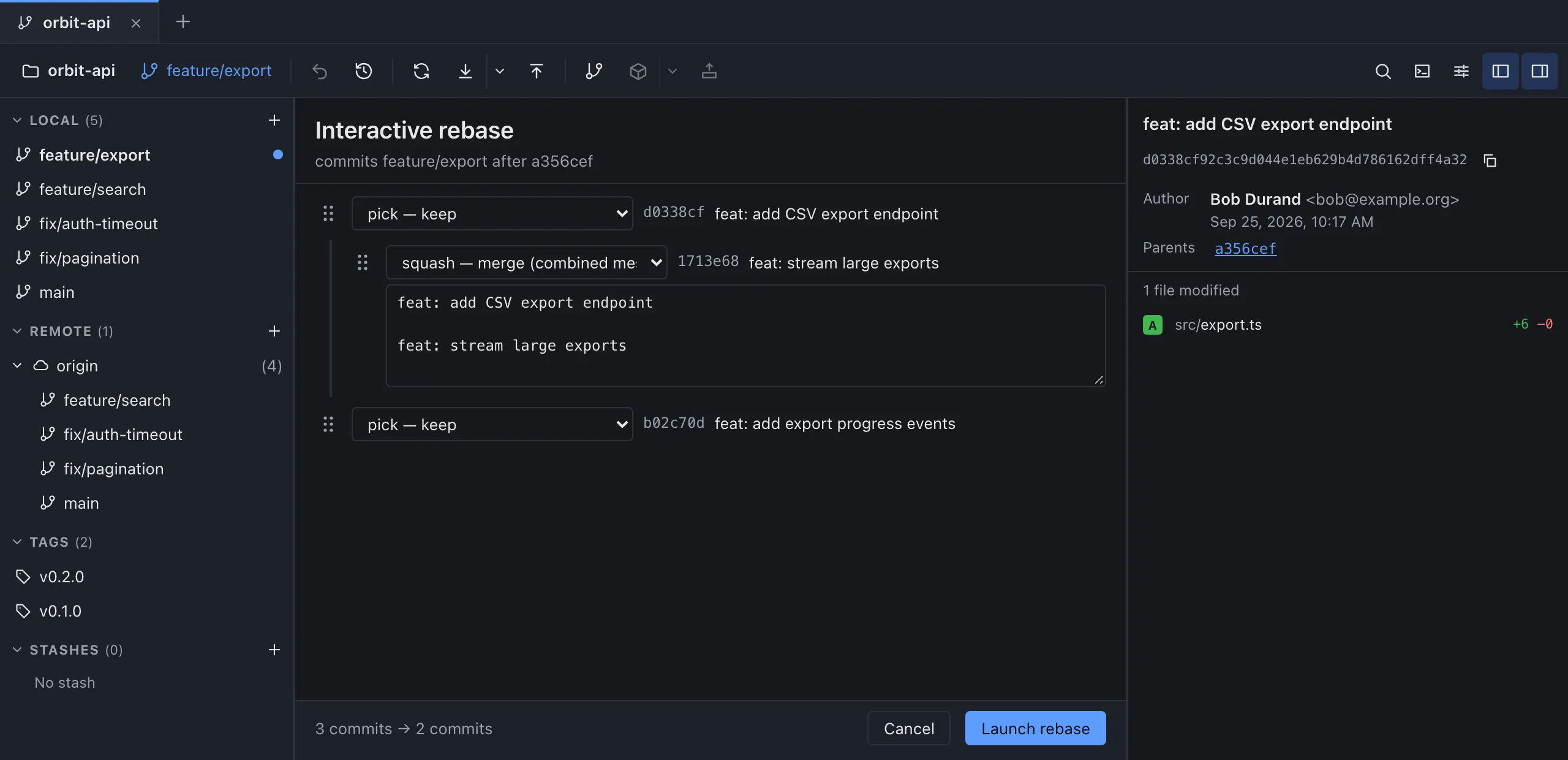
In GitMini, open the Interactive rebase panel: with feature/retry checked out, right-click main and choose Interactive rebase of “feature/retry” on “main”…. Drag a commit by the grip on the left of its line, or put the focus on a line or its grip and press Alt+↑ or Alt+↓ (not inside the action menu or a text field), then click Launch rebase.
Handle a conflict or return to the starting point
Now the dependent case. Switch to the marker branch with git checkout start, so the reordered branch stays as it is, run git rebase -i main again and swap the last two commits, so that feat: raise retries to 5 comes before the commit that adds the retries line:
pick 8864acb docs: describe the retry option
pick ab7f160 feat: raise retries to 5
pick 6298bfd feat: add retry option
Git stops on the commit that no longer applies:
Auto-merging src/config.ts
CONFLICT (content): Merge conflict in src/config.ts
error: could not apply ab7f160... feat: raise retries to 5
Resolve all conflicts manually, mark them as resolved with
"git add/rm <conflicted_files>", then run "git rebase --continue".
You can instead skip this commit: run "git rebase --skip".
To abort and get back to the state before "git rebase", run "git rebase --abort".
Could not apply ab7f160... feat: raise retries to 5
These outputs come from Git 2.30; Git 2.54 starts the advice lines with hint: and writes each commit subject after a #, in the last line and in the todo list. The file explains why. The branch being rebuilt has no retries line yet, because the commit that adds it now comes later:
export const timeoutMs = 1000;
<<<<<<< HEAD
=======
export const retries = 5;
>>>>>>> ab7f160 (feat: raise retries to 5)
I resolved it by keeping retries = 5, staged the file and ran git rebase --continue. Git stopped again on feat: add retry option, with retries = 5 on one side and retries = 3 on the other. Two commits that keep conflicting are dependent, and a swap is the wrong tool. You have three options: resolve each stop and continue, git rebase --skip to leave out the commit being applied, or give up:
git rebase --abort
git rev-parse --short HEADab7f160The abort restored the branch exactly: ab7f160 is the original tip again. The git-rebase documentation describes --abort as resetting HEAD to where it was when the rebase started.
GitMini handles the stop with a banner. After you click Launch rebase, the panel closes and the banner reads “conflict by applying …” with the number of files in conflict. Continue stays disabled until you resolve and stage the files. Skip leaves out the commit. Abort asks “Back to status before the rebase? Ongoing resolutions will be lost.” and restores the branch.
Verify the final tree and graph
Back on the independent swap (git checkout feature/retry), check two things. First, the history: with --all, the marker shows the old line next to the new one.
git log --oneline --graph --decorate --all* ef3db49 (HEAD -> feature/retry) feat: raise retries to 5
* cc83efc docs: describe the retry option
* bde2a75 feat: add retry option
| * ab7f160 (start) feat: raise retries to 5
| * 6298bfd feat: add retry option
| * 8864acb docs: describe the retry option
|/
* 4eabd99 (main) chore: init orbit-apiSecond, the files. A pure reorder must not change the final content, so the tree hashes of the two tips should match:
git rev-parse start^{tree} HEAD^{tree}
git diff start HEAD
5be1b584768d24c1e7f4ffc6c97dd1b56a6c03fb
5be1b584768d24c1e7f4ffc6c97dd1b56a6c03fbThe hashes are identical and git diff prints nothing. If you had resolved a conflict, the diff would show what you changed while resolving it. To read the graph in GitMini, see the guide to the commit graph. If the branch is already on a remote, remember the rewrite needs a force push, which the interactive rebase guide explains.
Sources
- Pro Git: Rewriting History, consulted on October 4, 2026.
- Git documentation: git-rebase, consulted on October 4, 2026.
- GitMini product README, consulted on October 4, 2026.