Compare graph, staging, rebase and platform support
If you are looking for a GitKraken alternative, start from your routine rather than from a feature list. You read a history with several branches, prepare a commit, sometimes rewrite a few commits before pushing, and you work on the systems your team uses. Graph, staging, rebase and platforms are the four criteria this guide applies to any Git GUI, GitMini included.
One rule governs the table below: a cell contains only what its source says. GitKraken Desktop is read from GitKraken’s client page. The other tools come from the directory of GUI clients on git-scm.com, which listed 55 entries when we read it. For each entry it gives platforms, licensing and cost, and nothing about graph, staging or rebase. “Not stated” therefore means that the source is silent, not that the feature is missing. Licensing and cost are left out of this comparison: check them on each tool’s own site.
| Tool and source (read Oct. 4, 2026) | Graph | Staging | Rebase | Platforms |
|---|---|---|---|---|
| GitMini (product README, release docs and interface) | Commit graph with history search | By file and by hunk | Interactive: pick, reword, squash, fixup, drop, reorder | macOS (Apple Silicon, Intel), Windows x64, Linux x64 |
| GitKraken Desktop (client page) | Commit Graph | Not stated | Not stated | Linux, Mac, Windows |
| git gui and gitk, bundled with Git (git-gui, gitk) | gitk displays the commit graph; git gui does not show project history | git gui makes and amends commits; staging not detailed | Not stated | git gui: popular UNIX systems, Mac OS X, Windows (Cygwin, MSYS); gitk: not stated |
| GitHub Desktop (directory) | Not stated | Not stated | Not stated | Mac, Windows |
| SourceGit (directory) | Not stated | Not stated | Not stated | Linux, Mac, Windows |
We picked two directory entries with different platform coverage to keep the table short. Leaving out the others is not a judgment on them. Two more details from GitKraken’s page, for completeness: it names a diff view and merge and conflict tools, which fall outside the four criteria, and it mentions rebase only in a sentence about AI-assisted commit composition, without describing an interactive rebase feature. For anything beyond that, read GitKraken’s own documentation.
What to look at for each criterion:
- Graph. Can you read several branches at once, spot merge commits, search the history and open a commit’s details?
- Staging. Can you stage a whole file, a hunk (one block of changes) or single lines? Tools differ, and the directory does not say.
- Rebase. Is there an interactive rebase with reorder, squash, reword and drop, and what happens when the range contains a merge commit?
- Platforms. Which operating system and CPU architecture, which package format, how updates arrive, and which Git version the tool requires.
Try the tools on the same repository
A page cannot replace ten minutes with a repository. Build a throwaway one with diverging branches, a merge and pending changes, open it in each candidate, and check the result with Git rather than with the client. The commands below are Bash. We ran them with Git 2.23 and 2.54, so none of them needs a recent Git (GitMini itself requires 2.30 or newer). Run them in an empty scratch folder.
mkdir client-trial
cd client-trial
git init
git checkout -b main
git config user.name "Example Dev"
git config user.email [email protected]
seq 1 40 > notes.txt
echo "# Client trial" > README.md
git add .
git commit -m "Add notes and README"
git checkout -b feature/search
echo "search: index" > search.txt
git add search.txt
git commit -m "Add search index"
echo "search: ranking" >> search.txt
git commit -am "Rank search results"
echo "search: tests" >> search.txt
git commit -am "Add search tests"
git checkout main
git checkout -b fix/pagination
echo "pagination: fix" > pagination.txt
git add pagination.txt
git commit -m "Fix pagination"
git checkout main
echo "release 0.1" >> README.md
git commit -am "Prepare release 0.1"
git merge --no-ff fix/pagination -m "Merge branch 'fix/pagination'"
git log --graph --oneline --all
The last command prints the reference history. Your identifiers will differ, and so can the order of the lines. When all the commits fall within the same second, as they do if you paste the whole block, Git 2.23 prints the history below, while Git 2.30 and later (we ran 2.30, 2.43 and 2.54) list the three feature/search commits first, above the merge. It is the same history either way.
*   e4172e1 Merge branch 'fix/pagination'
|\
| * 003a193 Fix pagination
* | 25f5869 Prepare release 0.1
|/
| * ace3081 Add search tests
| * ce6bc7f Rank search results
| * 63a4b8d Add search index
|/
* 4bacbe3 Add notes and README
Now open client-trial in each tool and run four checks.
-
Graph. Compare the client’s graph with the output above. You should find three branch tips, one merge commit and parallel lanes. Select a commit and see what the tool shows about its author, date, parents and changed files.
-
Rebase. Check out
feature/search, then use the tool’s interactive rebase to squash “Add search tests” into “Rank search results”. Before,git log --oneline main..feature/searchlists three commits. After, it should list two.d66d2be Rank search results 63a4b8d Add search index -
Merge. Go back to
mainand mergefeature/search. Before the merge,git branch --merged mainlists onlyfix/paginationandmain. Afterwards it also listsfeature/search.feature/search fix/pagination * main -
Staging. Rewrite two distant lines of
notes.txtand add an untracked file. Git sees two hunks innotes.txt, because the edits are far enough apart.git checkout main seq 1 40 | sed '3s/.*/three/;38s/.*/thirty-eight/' > notes.txt echo "- write tests" > todo.txt git status --shortM notes.txt ?? todo.txtStage only the first change in the tool. A tool that stages by hunk does it directly, and the others show you what they offer instead. Then
git status --shortshould reportMMfornotes.txt, meaning that the file has both staged and unstaged changes, andgit diff --cachedshould show a single@@block.MM notes.txt ?? todo.txt
In GitMini, the same steps use these entries. With feature/search checked out, right-click Rank search results and choose Interactive rebase from here…. To merge, right-click the feature/search branch in the sidebar and choose Merge “feature/search” in “main”. For staging, open notes.txt from the Unstaged list and press Stage hunk on the first hunk. Also note what each tool does when it cannot perform a step: a clear message, or a silent workaround.
What GitMini supports today
GitMini is a desktop Git client built with Tauri, Svelte and Rust. It reads repositories with gix and runs every change through the Git CLI, so the Git installed on your machine does the writing. Here is what the current source tree (version 0.1.0) and its README establish.
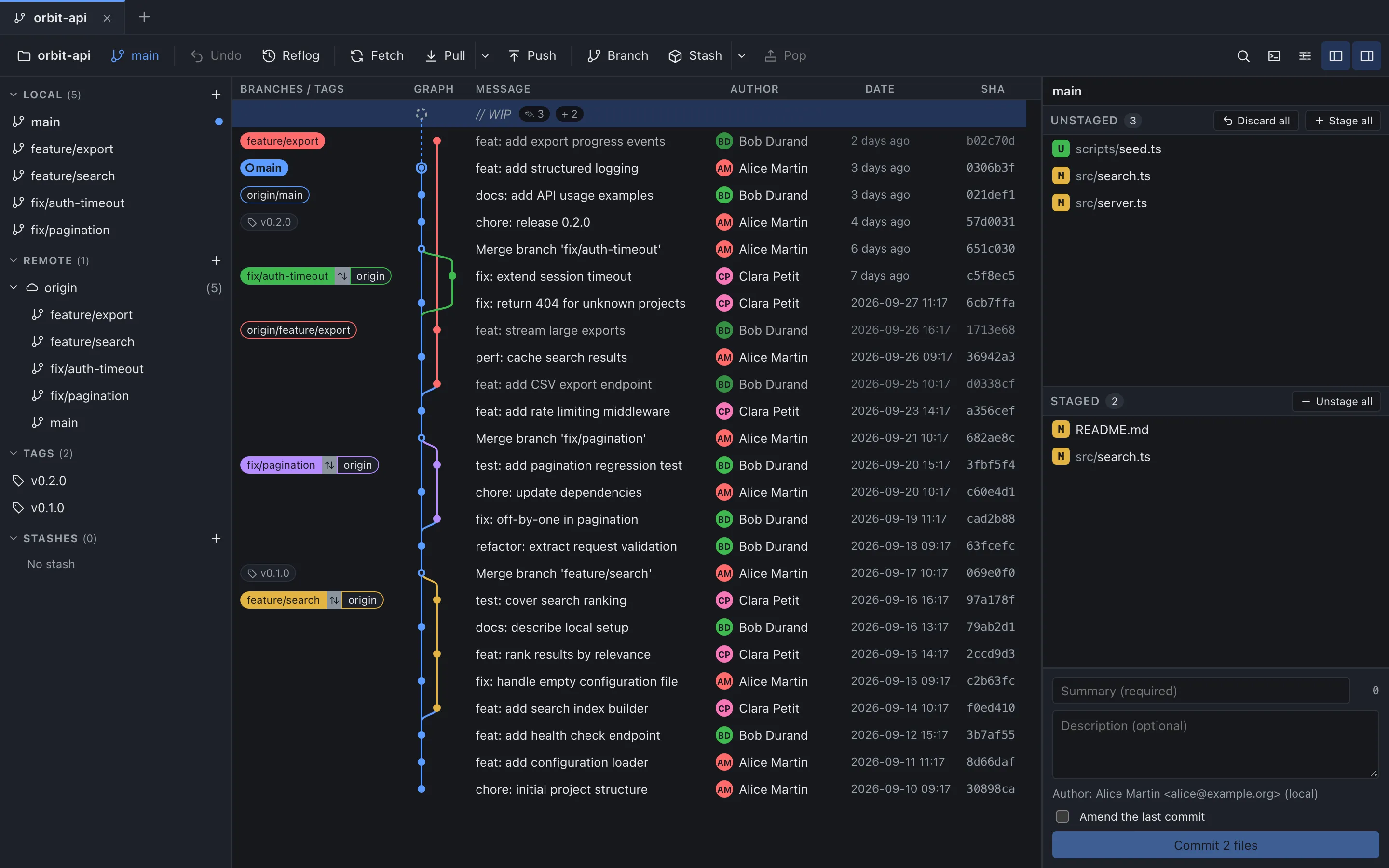
- Graph and history. A commit graph with columns for branches and tags, message, author, date and SHA. You can search by message, author or SHA, read diffs and keep several repositories open in tabs.
- Staging and commits. Unstaged and Staged lists, with Stage, Unstage, Stage hunk, Unstage hunk and Discard hunk, plus a commit form with Amend the last commit. The guide to staging and commits walks through it.
- Branches and history rewriting. Merge (fast-forward when possible, always a merge commit, or fast-forward only), rebase, cherry-pick, revert and stash. The interactive rebase offers pick, reword, squash, fixup, drop and drag-to-reorder: see the interactive rebase guide.
- Remotes. Fetch, pull and push, and clone or add remotes by URL.
Limits to weigh before you choose
- No GitHub sign-in. Connecting a GitHub account is disabled in current builds. You clone and add remotes by URL and authenticate with SSH keys or a Git credential helper.
- Staging stops at the hunk. You can stage, unstage or discard a file or a hunk, but not individual lines.
- Interactive rebase has two exclusions. A range that contains merge commits is not supported in this first version, and neither is a detached HEAD.
- Conflicts are resolved in your editor. GitMini lists the conflicted files and offers Mark as resolved, but the resolution itself happens in your editor.
- Some repositories are refused. Bare repositories, SHA-256 repositories and reftable repositories are not supported.
- The interface is in English. All application text uses the English catalogs.
- Git 2.30 or newer is required and must be available in your
PATH. - Installers are not fully signed yet. The first macOS builds use an ad hoc signature and are not notarized. Windows .exe installers initially have no Authenticode signature. The README asks you to check the release’s
SHA256SUMSbefore installing. - A short list of formats. DMG for macOS (Apple Silicon or Intel), .exe for Windows, AppImage or DEB for Linux. The Windows and Linux builds are x64.
Choose and verify the right download
Choose by elimination. If you need to stage individual lines or want a built-in conflict editor, confirm that your candidate has them, because GitMini offers neither. If a tool does not run on a system your team uses, drop it. If several tools remain, run the trial above on your own repository.
If GitMini fits, take the format for your system. Automatic updates use a signature of their own, separate from operating-system code signing.
| System | Download | Updates |
|---|---|---|
| macOS | DMG for Apple Silicon or Intel | Automatic |
| Windows | EXE | Automatic |
| Linux | AppImage or DEB | AppImage: automatic. DEB: manual or through a package manager |
The system guides go further: Git GUI for Linux, Git GUI for macOS and Git GUI for Windows. Before you install anything, check Git and the checksum.
git --versiongit version 2.43.0Any version from 2.30 up works. Then compare your file’s SHA-256 with the line for it in the SHA256SUMS file published with the release. Verify first, then follow the first-launch notice for your system.
Sources
- Git: official directory of GUI clients, consulted on October 4, 2026.
- GitKraken: official client page, consulted on October 4, 2026.
- Git documentation: git-gui, consulted on October 4, 2026.
- Git documentation: gitk, consulted on October 4, 2026.
- GitMini product README, consulted on October 4, 2026.
- GitMini product release documentation (docs/releases.md), consulted on October 4, 2026.